Guide
Agent-based workflow
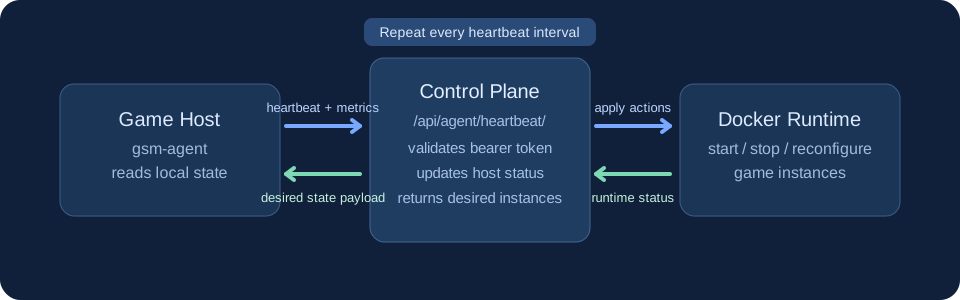
The agent runs on each game host and periodically syncs host and instance state with the control plane. The platform responds with the desired instance configuration.
1. Installation
Install the agent runtime on each host where game servers should run.
# Example host setup
apt update
apt install -y docker.io
mkdir -p /opt/gsm-agent
2. Configuration
Configure the control-plane URL and token for the host.
# Example environment variables
GSM_ADMIN_URL=https://your-gsm-domain.example
GSM_AGENT_TOKEN=replace-with-issued-token
GSM_AGENT_HEARTBEAT_PATH=/api/agent/heartbeat/
GSM_AGENT_INTERVAL_SECONDS=30
3. Heartbeat flow
The agent first registers itself at
/api/agent/register/, then sends regular heartbeat requests to
/api/agent/heartbeat/ with bearer authentication and receives
desired instance state in response.
4. End-to-end onboarding workflow
- Create a Host in the Django admin (
hostname,owner, optionalip_address). - Create a GameDefinition with image and defaults (
default_env,default_ports,default_volumes). - Create/open the host AgentToken, rotate it, and copy the plaintext token immediately.
- Create a GameServerInstance for the host+definition and set
desired_state(usuallyrunning). - Start
gsm-agenton the host with--admin-urland--token. - Verify
Host.last_seenupdates and the matching Docker container is created/stopped based on desired state.
# Example local run on host
python gsm_agent.py \
  run \
  --admin-url "$GSM_ADMIN_URL" \
  --token "$GSM_AGENT_TOKEN"
5. Operations checklist
- Ensure outbound network access from host to control plane.
- Rotate agent tokens periodically.
- Monitor heartbeat freshness and host status.
- Apply server template updates through admin before rollout.